Comment spam, caught and explained
Synth reads each incoming comment — the text, the name, and the link behind it — and hands your site a verdict. Spam goes to the Spam folder your site already has, labelled with what it was, so you can see the decision and undo it. Nothing is ever deleted.
Get a site keyFree to begin. No account to create, no card, no dashboard to learn.
-
A comment arrives
Whether it came through the comment form, the REST API or XML-RPC — and whether it is a comment, a pingback or a trackback — the plugin catches it before publication and sends it for a verdict. Your visitor is not left waiting while that happens.
-
Synth reads it
Not a keyword list and not a reputation lookup. The comment is judged on what it is trying to sell — including the website field, where link-drop spam keeps its payload while the visible text stays perfectly polite.
-
Your Comments list shows the answer
Spam is filed in the Spam folder, and the row carries the category the classifier assigned and how sure it was. A comment in that folder is explainable instead of mysterious, and a mistake is one click to undo.
What a keyword list cannot do
A filter built on lists matches strings, so the spammer edits the string until it stops matching — and that is the spam that reaches you, because everything else was already caught. Synth judges the comment by what it is trying to sell, so rewriting it does not help. It also reads the field most comment spam actually cares about, the commenter's website, where a link sits behind one short and entirely innocent sentence that no text filter has any reason to flag.
You can see why
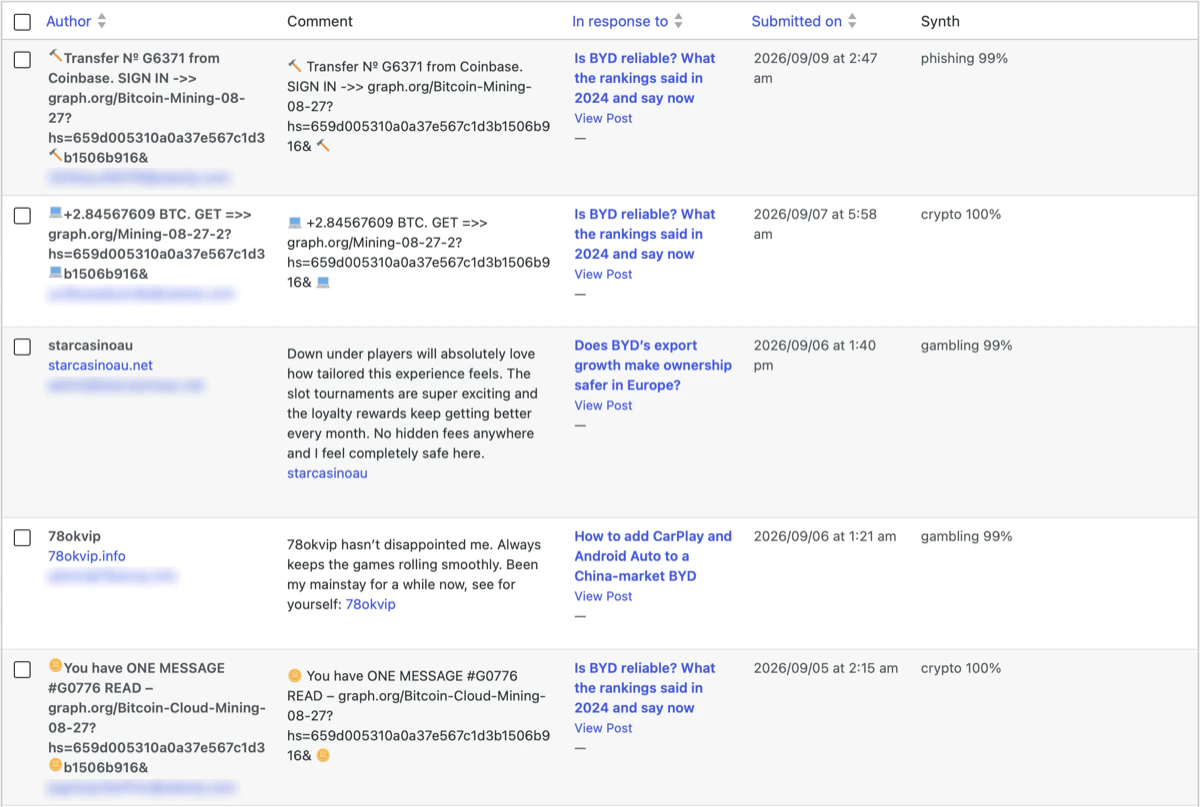
Every checked comment gets a Synth column in your Comments list, naming the category — phishing, crypto, gambling, and the rest — and how sure the classifier was. You can tell at a glance which decisions were obvious and which are worth a second look, so the Spam folder becomes something you trust rather than something you never open.
It works with your moderation, not around it
A decision you have already made wins. If you approved a comment, or Akismet or another filter has already ruled on it, Synth does not overturn that. Comments from people who can moderate your site, and from anyone who already has an approved comment on it, are recognised as trusted and never sent at all — they cost you nothing and are never in question.
Nothing is ever deleted
Spam is filed in the Spam folder, never in Trash. WordPress empties Trash on a schedule and does not empty Spam, so a comment filed there by mistake stays recoverable for as long as you keep it. If you would rather look before anything is filed, strict mode sends the same comments to the moderation queue instead.
If Synth cannot be reached
Your site keeps working when ours does not. By default a comment we could not answer for is handed back to WordPress untouched and treated exactly as it would have been without the plugin. If you would rather nothing slipped through during an outage, one setting holds such comments for review instead.
When the month's checks are used up
When a key has used the checks its plan includes for the calendar month, we stop sending comments for a verdict until the month begins again. Your site carries on moderating on its own terms, exactly as it did before you installed anything — your comment rules still apply, and nothing here is taken away from you. If you would rather unchecked comments waited for the new month, that is a setting you choose.
What leaves your site
Only what a verdict needs: the comment itself and a short list of fields around it. The commenter's email address is never sent — only its domain, and a one-way hash made with a secret belonging to your site alone. Neither the network address their browser connected from nor their browser's identification string is sent at all. The plugin adds no scripts to your pages and does not track your visitors. Every field is listed one by one in the privacy policy below.
Plans
A plan sits on a site key and sets how many checks that key may run in a calendar month. The allowances and the prices are on the pricing page — that page states them once, so they cannot drift out of step here.
Getting started
Install the Synth Antispam plugin, open Settings → Synth Antispam and press Get a site key — nothing to copy by hand and no account to create. Or take a key from the pricing page before installing anything and paste it into that same screen. A key is not tied to a site until the first site uses it.
Get a site key